
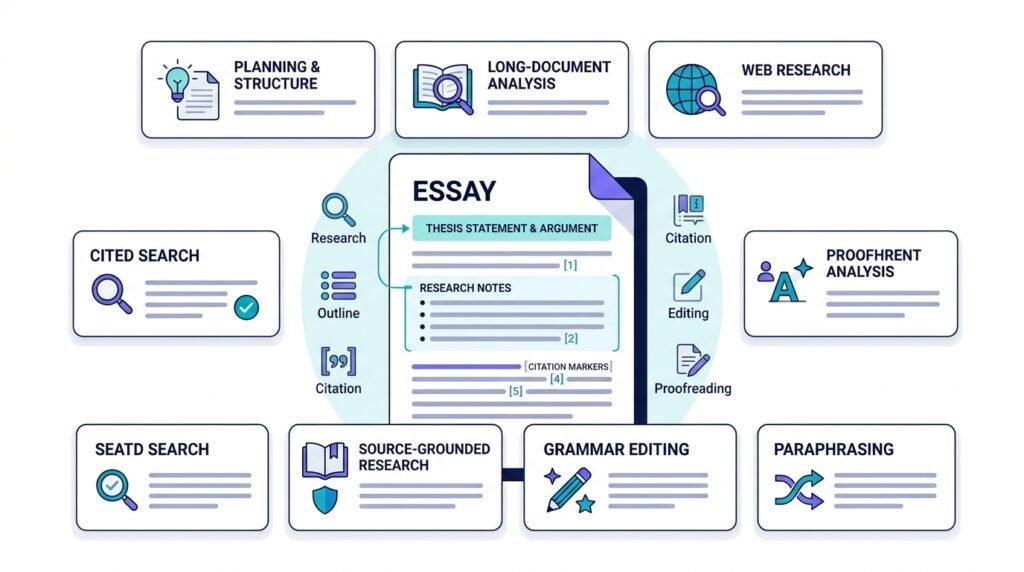
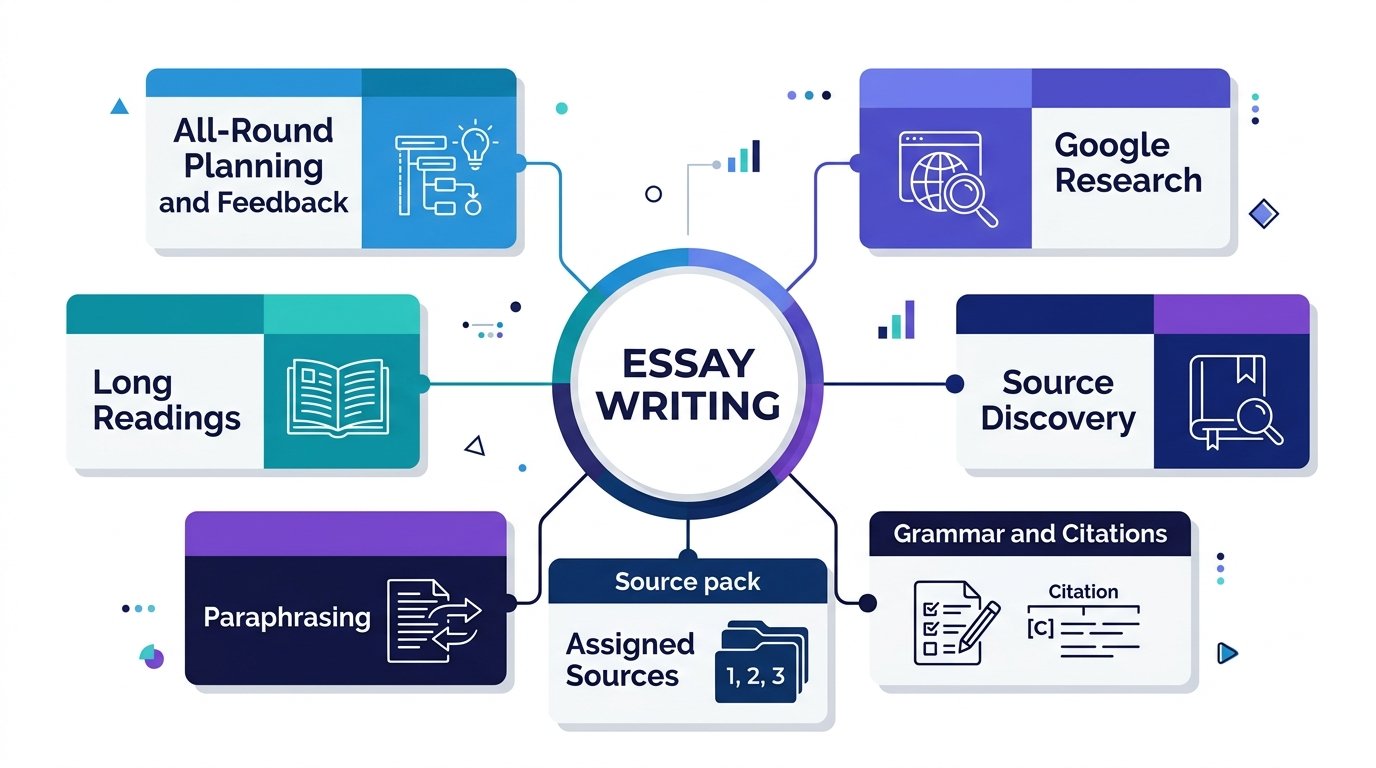
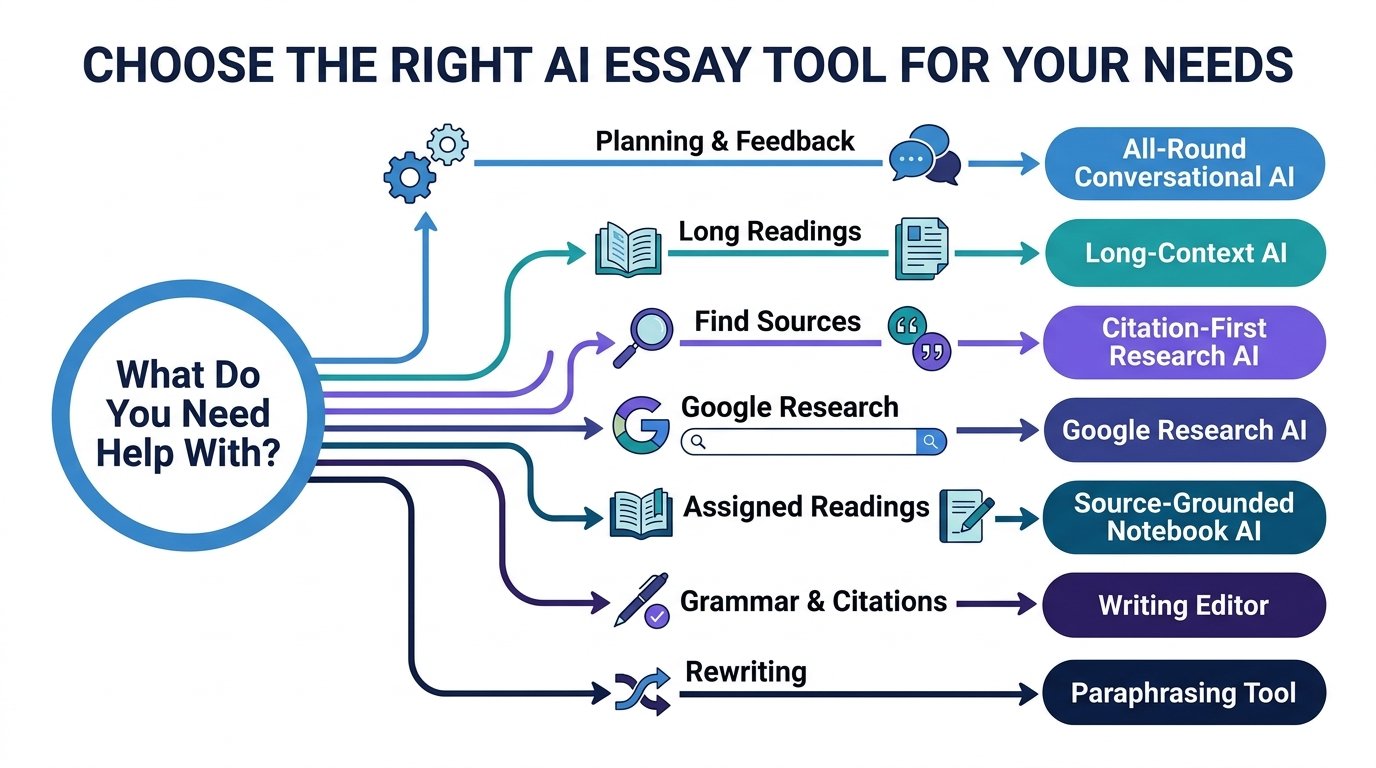
The best AI for writing essays depends on which part of the assignment is difficult. ChatGPT is the strongest all-round choice for planning, explanations and draft feedback. Perplexity is better for finding sources, NotebookLM is excellent when your essay must stay close to assigned readings, and Grammarly is strongest when the draft already exists and needs polishing.
Claude, Gemini and QuillBot also have clear strengths. Claude handles long readings well, Gemini is useful for research that draws on Google Search and connected Google sources, while QuillBot helps with careful sentence rewriting and citations.
For graded work, follow your school, university or instructor’s AI policy. AI is most useful when it helps you understand the topic, find evidence, test your argument and improve your own writing rather than replacing the work you were expected to do.
Quick Answer: Which AI Is Best for Writing Essays?
There is no single winner for every part of essay writing.
| AI Tool | Best For | Main Strength |
|---|---|---|
| ChatGPT | Best overall essay assistant | Planning, explanations, feedback and Study Mode |
| Claude | Long readings and detailed critique | Working with large academic files |
| Gemini | Google-based research | Deep Research with Search, Drive and uploaded files |
| Perplexity | Finding sources | Web research with visible citations |
| NotebookLM | Essays based on assigned sources | Source-grounded answers with inline citations |
| Grammarly | Editing and citation formatting | Grammar, clarity, plagiarism checks and citations |
| QuillBot | Rewriting and paraphrasing | Sentence revision and citation tools |
The right tool depends on your job.
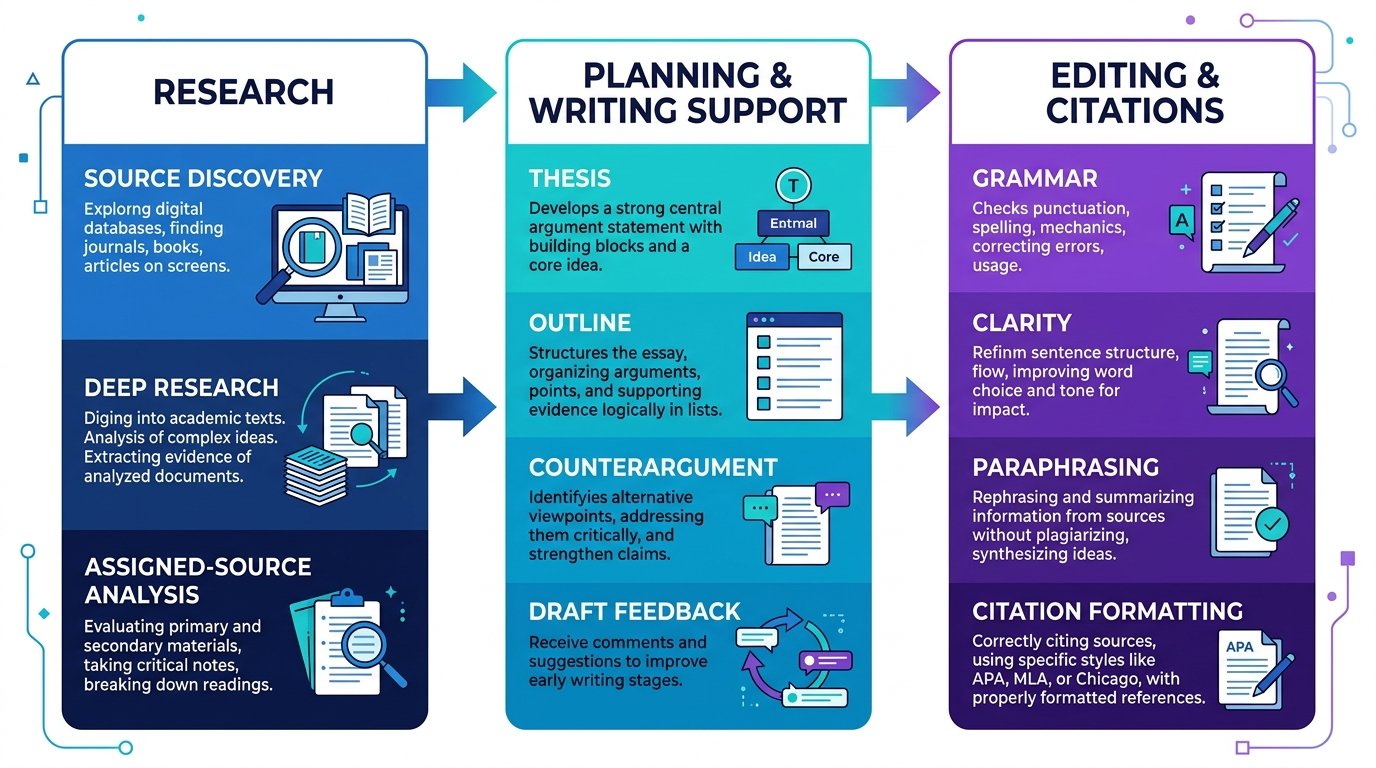
If you are still researching, start with Perplexity, Gemini or NotebookLM.
If you are planning or reviewing an argument, ChatGPT or Claude is usually more useful.
If the essay is already written, Grammarly or QuillBot can help with the final language and citation work.
How We Compared These AI Essay Tools
This comparison focuses on what a student actually needs during an essay assignment.
The main criteria are:
- Research quality
- Source visibility
- Ability to work with uploaded readings
- Essay planning
- Thesis development
- Counterargument support
- Draft feedback
- Citation support
- Grammar and style
- Ease of checking sources
- Learning support
- Free access where available
- Academic-integrity guidance
We did not give each tool an artificial numerical score. A research-first tool and a grammar editor do different jobs, so one total score would hide the reason you might choose one over another.
Best AI Essay Tools Compared
| Tool | Research | Planning and Draft Help | Citations | Editing | Best Use |
|---|---|---|---|---|---|
| ChatGPT | Strong | Excellent | Verify generated references | Strong | Whole essay process |
| Claude | Strong | Excellent | Verify generated references | Strong | Long source packs |
| Gemini | Excellent | Strong | Strong in research workflows | Good | Google-centered research |
| Perplexity | Excellent | Good | Excellent for source discovery | Good | Finding evidence |
| NotebookLM | Excellent within supplied sources | Good | Excellent source-linked citations | Good | Assigned readings |
| Grammarly | Limited research | Good | Strong formatting and source support | Excellent | Final polish |
| QuillBot | Limited to moderate | Good | Strong citation tools | Strong | Rewriting and paraphrasing |
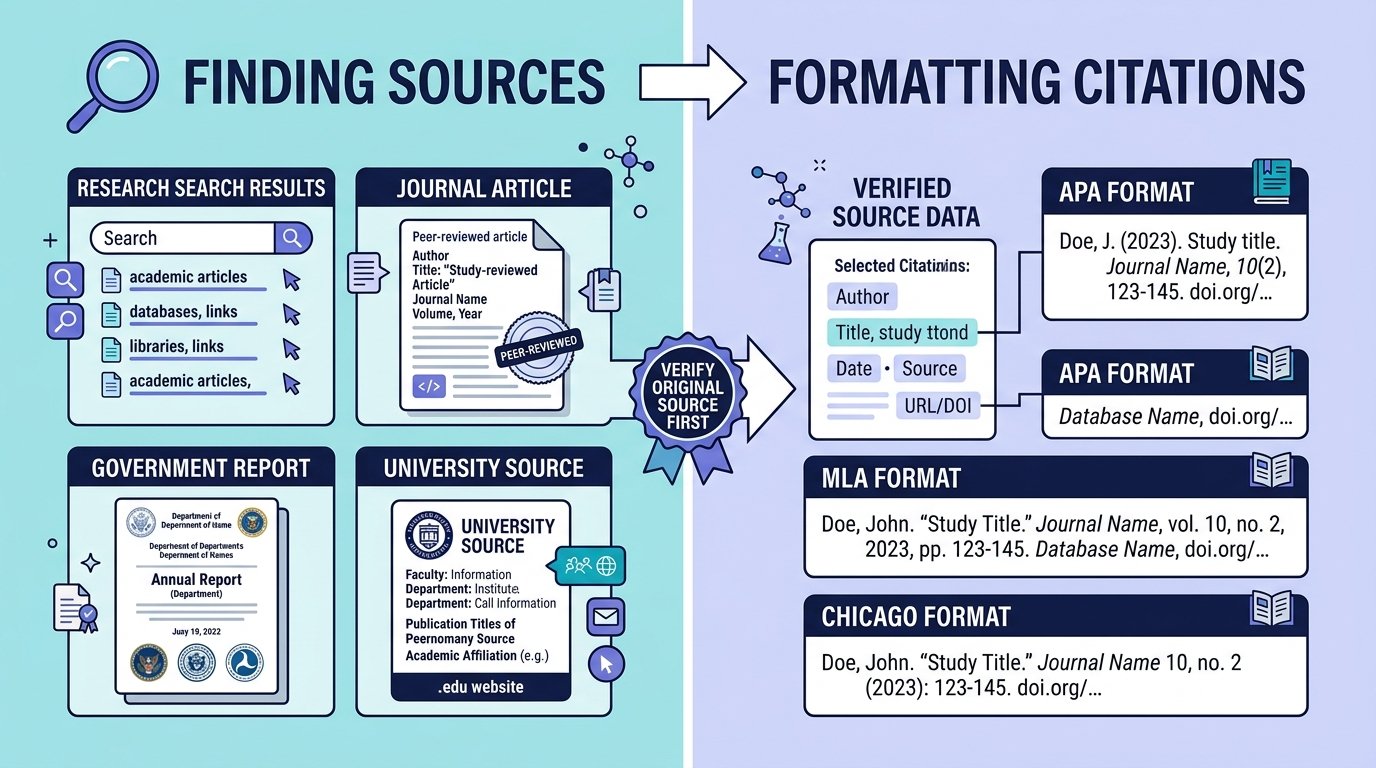
The important distinction is finding sources versus formatting citations. Perplexity and NotebookLM are strong at showing where information came from. Grammarly and QuillBot are useful when you need a reference formatted correctly.
1. ChatGPT: Best Overall AI for Essay Planning and Feedback
ChatGPT is the most flexible option in this list because it can help at nearly every stage without forcing you into one workflow.
It is especially useful for:
- Breaking down an essay question
- Brainstorming possible angles
- Building an outline
- Improving a thesis statement
- Testing an argument
- Finding weaknesses in a draft
- Explaining difficult course material
- Creating practice questions
- Reviewing uploaded PDFs or class notes
OpenAI’s Study Mode is particularly useful for students. It can guide you with questions, explain ideas in layers, quiz you, and work with uploaded course materials such as notes, syllabi, slides, worksheets and PDFs.
OpenAI also tells students to follow the AI-use rules of their school or instructor for graded work. Source: OpenAI Help — Using Study Mode in ChatGPT
Best Way to Use ChatGPT for an Essay
Instead of asking:
Write my 1,500-word essay about social media and politics.
use a prompt that keeps you involved:
I am writing a 1,500-word essay about whether social media
improves political participation.

Do not write the essay for me.

Help me:
1. narrow the question,
2. develop three possible thesis statements,
3. identify three arguments,
4. identify one strong counterargument,
5. tell me what evidence I should research.
That gives you a structure to work from while leaving the actual reasoning and writing in your hands.
Where ChatGPT Is Weaker
Do not assume every citation or source reference generated in a normal chat is accurate.
If ChatGPT names a paper, article, author or statistic, open the original source and verify it before using it in academic work.
Best For
Choose ChatGPT when you want one tool for planning, understanding, feedback and revision.
2. Claude: Best for Long Readings and Detailed Draft Feedback
Claude is a strong choice when your assignment includes a large amount of reading.
Anthropic’s current Claude for Education documentation highlights support for:
- Hundreds of pages of text
- Academic papers
- Research documents
- PDFs
- DOCX files
- CSV files
- Projects with shared knowledge
- Long source analysis
Source: Anthropic Help — Use Claude for Education at your university
That makes Claude especially useful for essays where you need to compare several readings before you decide what to argue.
Useful Claude Prompt
Read these three research papers.

For each one, identify:
- the main claim,
- the evidence used,
- one important limitation.

Then show:
- where the authors agree,
- where they disagree,
- which points could support my essay question.
This is more valuable than asking Claude to produce a finished essay because it turns a large reading pack into a structured research map.
Claude for Draft Feedback
Claude is also useful when you already have a draft.
You can ask:
Review this essay as a critical editor.

Do not rewrite it.

Tell me:
1. where my argument becomes unclear,
2. which paragraph does not support my thesis,
3. where I make a claim without evidence,
4. which counterargument I have not answered.
Best For
Choose Claude when your biggest problem is reading, comparing and reasoning across long academic material.
3. Gemini: Best for Google-Based Essay Research
Gemini is a strong choice when your research starts on the web or inside Google’s ecosystem.
Gemini Deep Research can build a research plan, search the web, analyze sources and produce a longer report. Google Search is included as a source by default, while eligible users can also add sources such as Drive, Gmail, uploaded files and NotebookLM notebooks.
Source: Google Gemini Help — Use Deep Research in Gemini Apps
Useful Gemini Prompt
Research both sides of this essay question.

Prefer:
- peer-reviewed research,
- government sources,
- university sources.

Separate evidence from opinion.

Give me the source links so I can open and check every claim.
When Gemini Is Especially Useful
Gemini becomes more useful when your course materials already live in:
- Google Drive
- Google Docs
- Gmail
- NotebookLM
You can combine web research with your own allowed source material when the relevant Google Workspace connections are enabled.
Important Limitation
Deep Research can help you find and organize evidence, but the final essay still needs source checking.
A research report is a starting point, not permission to cite everything without opening the original material.
Best For
Choose Gemini when you want broad research with Google Search and connected Google sources.
4. Perplexity: Best AI for Finding Essay Sources
Perplexity is the strongest research-first tool in this comparison.
Its current Research mode performs multiple searches, reads many sources and builds a longer research report. Free users get limited access to Research, while paid plans offer higher limits.
Source: Perplexity Help — What is Research mode?
Perplexity also labels some sources as Government, Academic or Trusted, which can help you understand the type of source you are looking at.
Source: Perplexity Help — Understanding source labels
Perplexity also added access to Wiley research content in 2026, including academic and professional publications in areas such as medicine, business, STEM and psychology.
Source: Perplexity Help — Using Perplexity with Wiley
Best Perplexity Prompt for Essay Research
Find five credible sources on this topic.

Prefer:
1. peer-reviewed research,
2. government sources,
3. university sources.

For each source:
- give me the link,
- explain the main claim,
- tell me why it may be useful for my essay,
- identify any obvious limitation.
Do Not Cite the Perplexity Answer
Use Perplexity to find the source.
Then:
- Open the original page or paper.
- Read the relevant section.
- Confirm the author and publication details.
- Check that the source actually supports your claim.
- Cite the original source.
That is much safer than treating an AI-generated summary as the source itself.
Best For
Choose Perplexity when your hardest task is finding current, traceable evidence quickly.
5. NotebookLM: Best for Essays Based on Assigned Sources
NotebookLM is one of the best options when your teacher has already given you the material you are supposed to use.
Google describes NotebookLM as an AI research assistant that answers questions based on the sources inside your notebook and provides clear inline citations.
Source: Google NotebookLM Help — Learn about NotebookLM
Supported sources currently include:
- PDFs
- Google Docs
- Google Slides
- Google Sheets
- Word files
- PowerPoint files
- Websites
- YouTube videos
- Audio
- Images
- ePub files
- Copied text
Source: Google NotebookLM Help — Add or discover new sources
Best NotebookLM Scenario
Suppose your lecturer gives you:
- Eight PDF readings
- Two lecture decks
- One research report
- Your own class notes
Put the approved materials into one notebook.
Then ask:
Using only these sources, identify three arguments
that could answer my essay question.

For each argument:
- show which sources support it,
- show which sources disagree,
- point me to the relevant citation.
NotebookLM is designed to stay grounded in the sources you provide, which makes it especially useful when an assignment should not wander into random web material.
Important Limitation
Source grounding does not remove your responsibility to read the cited passage.
A citation tells you where NotebookLM found support. You still need to check the context before using it.
Best For
Choose NotebookLM when your essay must be built from assigned readings or a fixed source pack.
6. Grammarly: Best for Editing, Clarity and Citation Formatting
Grammarly is strongest near the end of the essay process.
Its current essay tools cover:
- Grammar
- Clarity
- Conciseness
- Tone
- Proofreading
- Brainstorming
- Plagiarism checking
- AI-use transparency
- Citation generation
- APA, MLA and Chicago formatting
Source: Grammarly — Essay Writing Guide
Grammarly also offers a Citation Finder that can flag claims that may need support, suggest sources and format citations in APA, MLA or Chicago.
Source: Grammarly — Citation Finder
Best Grammarly Workflow
Use Grammarly after you have written the draft:
Write your own draft
↓
Check grammar
↓
Review clarity
↓
Check unsupported claims
↓
Format citations
↓
Proofread final version
Where Grammarly Is Weaker
It is not the first tool I would choose for a deep literature search.
Use a research tool first when you still need to find evidence.
Best For
Choose Grammarly when your essay already exists and needs clearer sentences, cleaner grammar and stronger citation formatting.
7. QuillBot: Best for Careful Rewriting and Paraphrasing
QuillBot is most useful when you already know what you want to say but a sentence is awkward or repetitive.
It can help with:
- Paraphrasing
- Sentence restructuring
- Citation generation
- In-text citations
- Bibliography creation
- Rewriting your own rough wording
QuillBot’s Citation tool lets users create citations and insert in-text citations, while its free citation generator supports common styles including APA, MLA and Chicago.
Sources: QuillBot Help — Using the Citations tool QuillBot Help — Is the Citation Generator free?
Good Use of QuillBot
You wrote:
The results show that the policy had several different
effects depending on the age of the people involved.
You can use QuillBot to explore clearer alternatives, then choose the wording that still sounds like you.
Risky Use
Do not paste a source paragraph into a paraphraser, remove the citation and submit the output as your own.
QuillBot itself says that paraphrasing another source still requires a proper citation and that its tool is not designed to bypass plagiarism detection.
Source: QuillBot Help — Is using a paraphrasing tool plagiarizing?
Best For
Choose QuillBot when you need sentence-level rewriting or paraphrasing while keeping proper attribution.
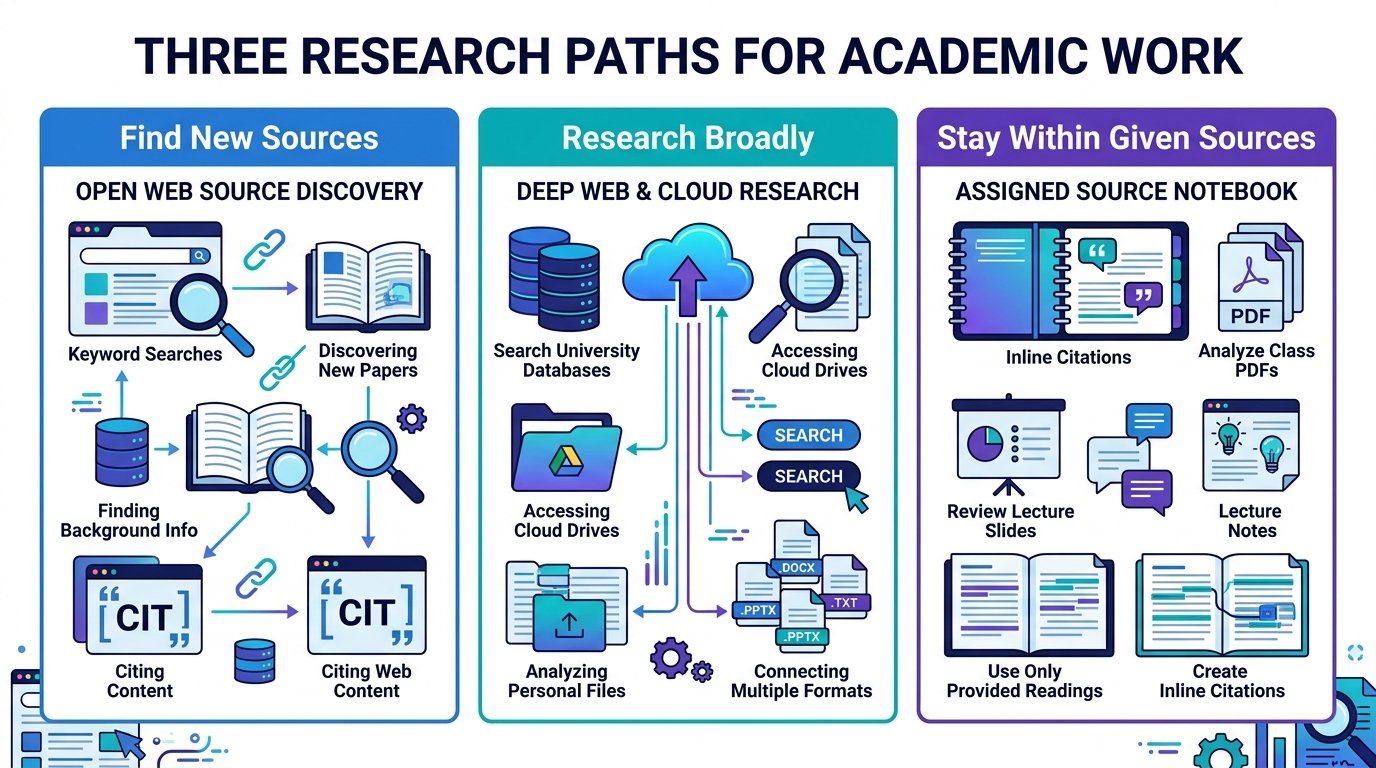
Best AI for Researching an Essay
For open-web research, Perplexity is the strongest first choice because the source links are central to the experience.
Use Gemini Deep Research when you want broad research that can combine Google Search with connected Google sources.
Use NotebookLM when your assignment should stay inside a fixed set of approved materials.
A simple decision looks like this:
Need new web sources?
→ Perplexity or Gemini

Already have assigned sources?
→ NotebookLM
Do not use the same research workflow for every essay.
Best AI for Writing an Essay Outline
ChatGPT and Claude are the strongest choices for outlines.
Do not ask for a generic five-paragraph structure.
Give the tool:
- Essay question
- Word count
- Required sources
- Citation style
- Your current thesis idea
- Any course requirements
Then ask:
Turn my essay question into an argument plan.

For each section, tell me:
- what claim I need to make,
- what evidence I need,
- how the section connects to my thesis.

Do not write the paragraphs.
That produces a useful writing plan without turning the tool into a ghostwriter.
Best AI for Essay Citations
There are three different citation jobs.
Finding Sources
Use Perplexity.
It is designed around web research and visible source citations.
Linking Claims Back to Your Assigned Material
Use NotebookLM.
Its answers provide inline citations to the sources in your notebook.
Formatting APA, MLA or Chicago
Use Grammarly or QuillBot.
Grammarly offers APA, MLA and Chicago citation generation, while QuillBot supports a large range of citation styles through its citation tools.
The key distinction is:
Finding a source is not the same as formatting a source.
Best AI for Editing an Essay
Use different tools for different editing problems.
Grammar or Clarity Problem
Example:
Is this sentence too long or confusing?
Use Grammarly.
Argument Problem
Example:
Does paragraph four actually prove my thesis?
Use ChatGPT or Claude.
Awkward Wording
Example:
Give me three clearer ways to express this sentence without changing the meaning.
Use QuillBot, ChatGPT or Claude.
Do not accept every AI rewrite automatically. Read the new version and make sure it still means what you intended.
Best Free AI for Essay Writing
Several tools in this list provide useful free access, although exact limits change often.
Current examples include:
- ChatGPT Study Mode is available across ChatGPT plans.
- Gemini Deep Research is available with usage limits that vary by plan.
- Perplexity gives free users limited Research access.
- NotebookLM has free access with source and usage limits.
- Grammarly offers free writing and citation tools, while some advanced features require paid plans.
- QuillBot’s online Citation Generator is free.
Free-plan limits can change, so check the provider’s current plan page before starting a large assignment that depends on one tool.
The best free choice depends on the task.
For research, try Perplexity or Gemini.
For learning and planning, try ChatGPT Study Mode.
For assigned readings, NotebookLM is especially useful.
Best AI for College Essays
For college or university essays, prioritize:
- Source quality
- Evidence
- Citation accuracy
- Counterarguments
- Long readings
- Academic-integrity rules
A useful combination is:
Research
→ Perplexity / Gemini / NotebookLM

Planning and feedback
→ ChatGPT / Claude

Final editing
→ Grammarly / QuillBot
That workflow is stronger than asking one tool to generate the entire paper.
Best AI for School Essays
For school essays, the most useful AI features are often simpler:
- Explain the assignment
- Help build an outline
- Teach paragraph structure
- Ask practice questions
- Review grammar
- Explain why an argument is weak
Study Mode in ChatGPT is particularly useful when you want the AI to teach rather than simply give you an answer.
Follow your teacher’s rules on what AI assistance is allowed.
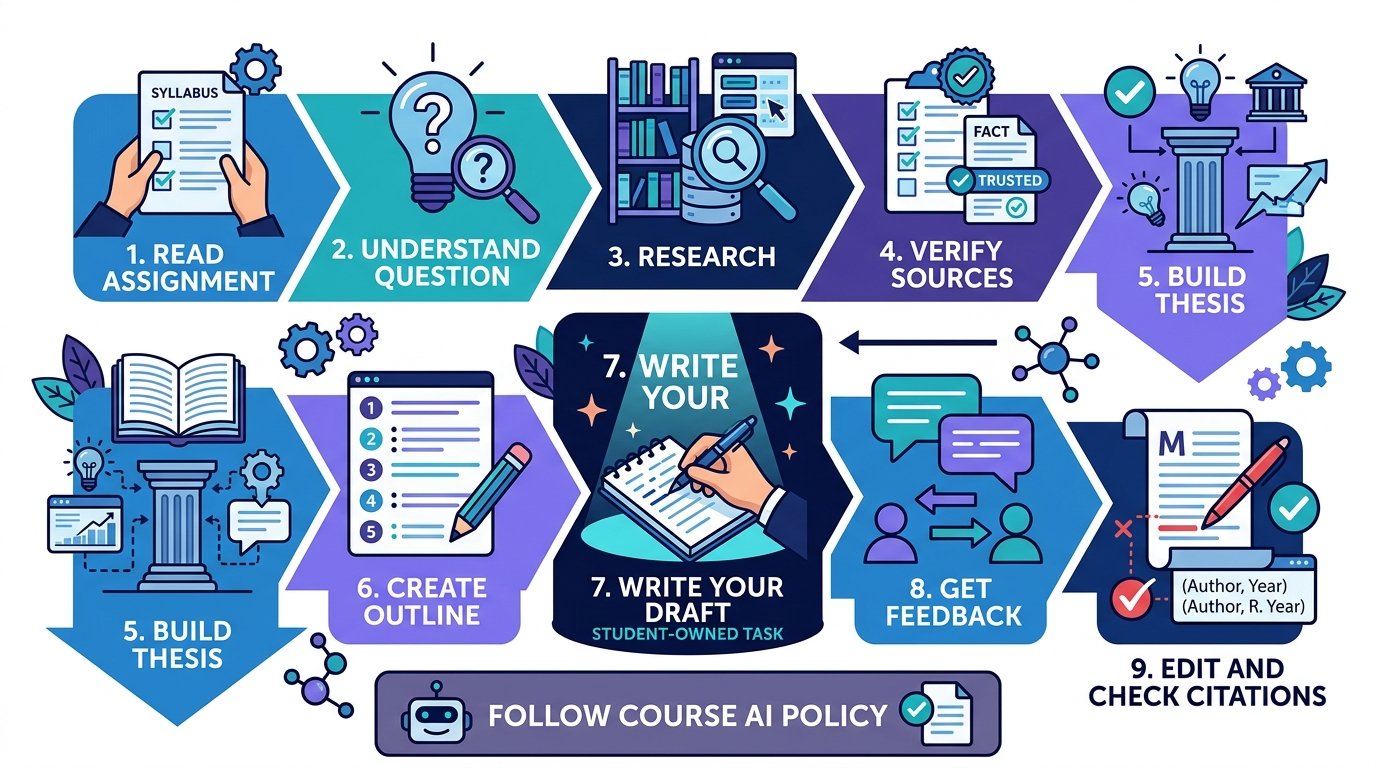
A Better AI Workflow for Writing an Essay
The strongest workflow keeps you responsible for the research, argument and final writing.
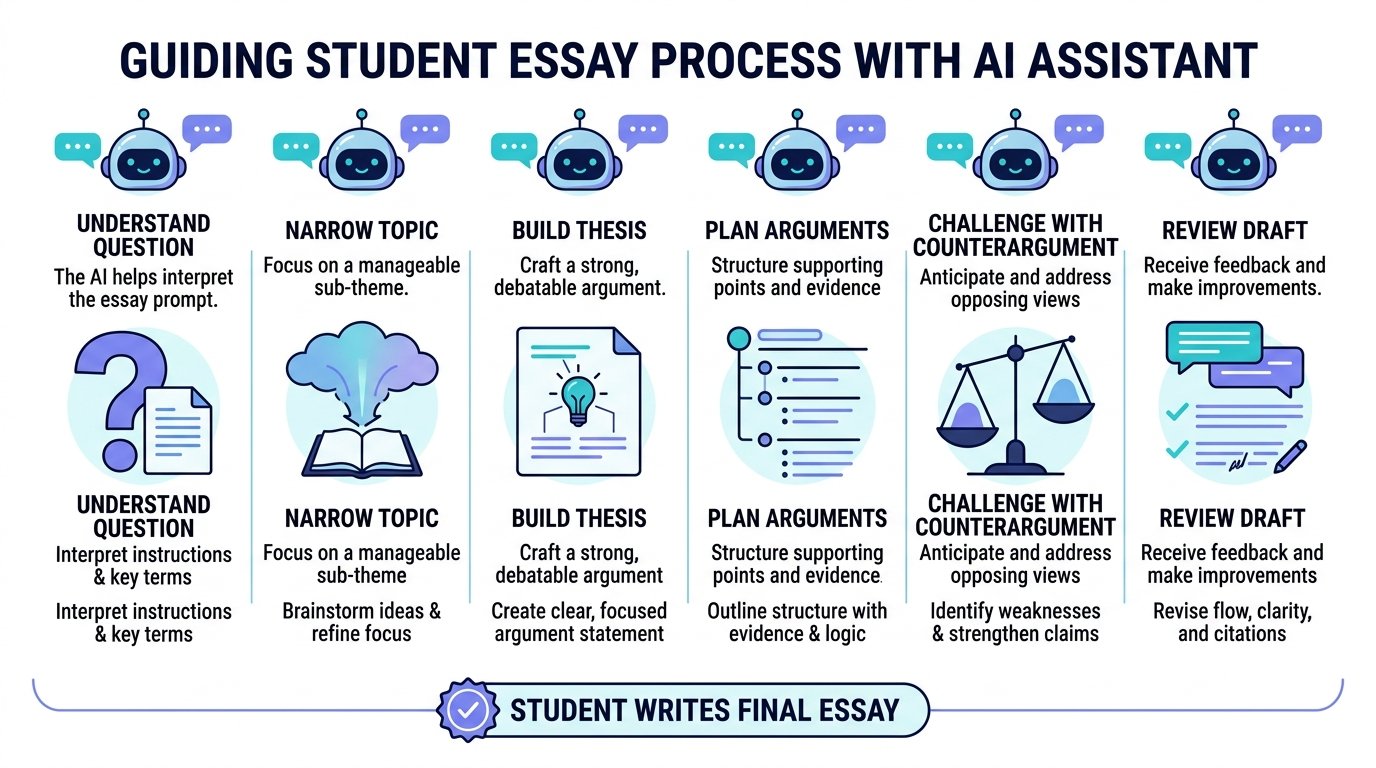
Step 1: Read the Assignment Yourself
Write down:
- Question
- Word count
- Required sources
- Citation style
- Deadline
- AI-use rules
Do this before opening an AI tool.
Step 2: Make Sure You Understand the Question
Ask:
Explain this essay question in simple language.

What exactly am I being asked to compare, argue or evaluate?
Then compare the explanation with the original assignment.
Step 3: Research the Topic
Use:
- Perplexity for open-web source discovery
- Gemini for broader Google research
- NotebookLM for assigned source packs
Collect the original sources rather than only saving AI summaries.
Step 4: Check Every Source
Open the source yourself.
Verify:
- Author
- Publication
- Date
- Main claim
- Relevant passage
- Whether it really supports your argument
Step 5: Build Your Thesis
You can ask AI to challenge your idea.
Here is my thesis.

Give me the strongest reasonable objection to it.

Do not rewrite my thesis yet.
A good counterargument can improve the final essay.
Step 6: Build the Outline
Map:
Introduction
↓
Argument 1 + evidence
↓
Argument 2 + evidence
↓
Counterargument
↓
Response
↓
Conclusion
Make sure each section has a job.
Step 7: Write the Draft
Write the paragraphs in your own words.
This is where your understanding and voice matter most.
Step 8: Ask for Feedback
Give ChatGPT or Claude the draft and ask for critique rather than a full rewrite.
Example:
Do not rewrite this essay.

Mark:
- unsupported claims,
- weak transitions,
- repeated points,
- paragraphs that do not support the thesis.
Step 9: Edit the Language
Use Grammarly or QuillBot carefully for:
- Grammar
- Clarity
- Repetition
- Sentence flow
- Citation formatting
Step 10: Verify Every Citation
Do not submit a citation you have not checked.
Step 11: Follow Your Course AI Policy
If AI use must be disclosed, disclose it in the form your institution requires.
Can AI Give Fake Essay Citations?
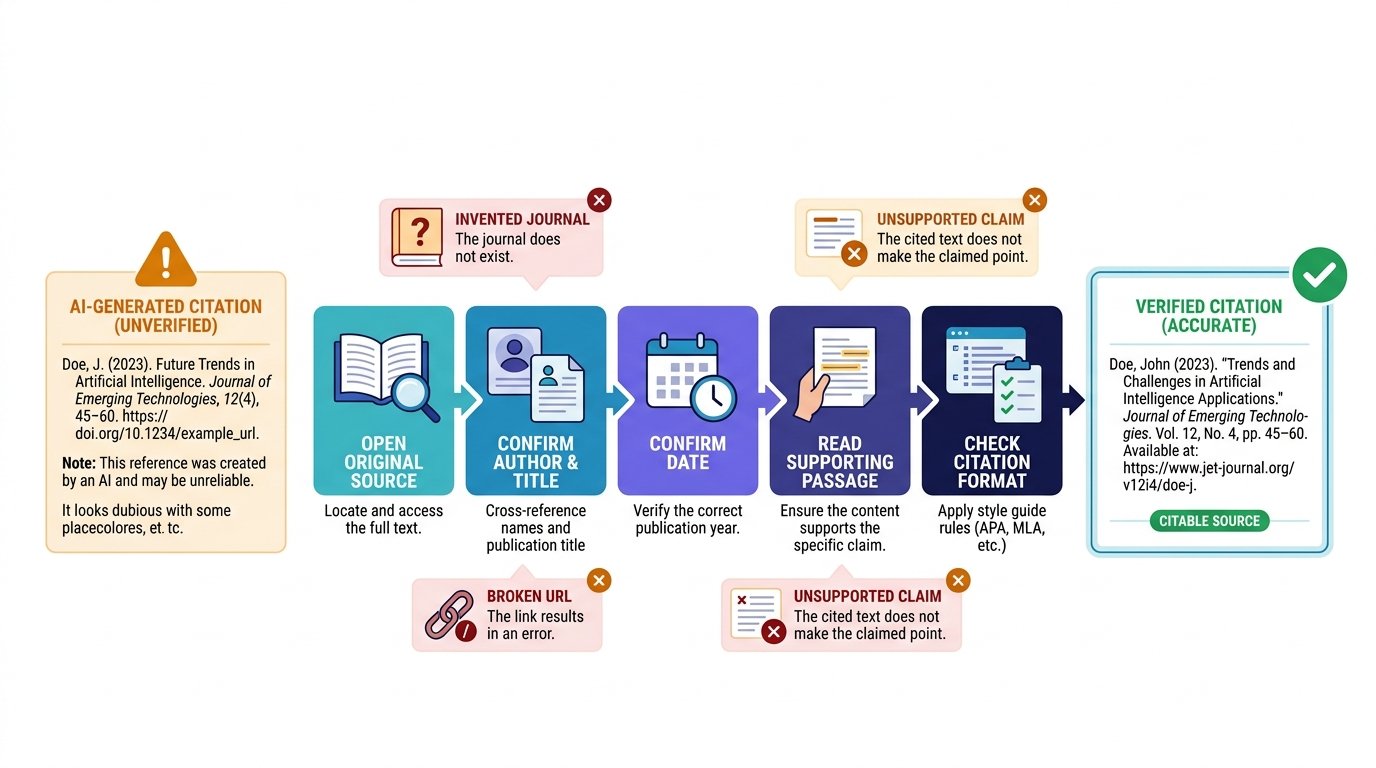
Yes.
Generative AI can produce incorrect or invented reference details.
Possible problems include:
- Wrong author
- Wrong paper title
- Wrong journal
- Incorrect DOI
- Broken URL
- Wrong publication year
- A real paper that does not support the stated claim
- A completely invented source
This is why you should never paste an AI-generated bibliography into your essay without checking each item.
Safe Citation Check
For every source:
- Open the original source.
- Confirm the title.
- Confirm the author.
- Confirm the date.
- Read the relevant passage.
- Check the citation style.
- Add it to your bibliography.
Even citation-first tools can make mistakes or misunderstand context.
Can Teachers Detect AI-Written Essays?
AI-detection tools can produce uncertain or incorrect results, so a detector result should not be treated as perfect proof of authorship.
The safer approach is not to ask how to hide AI use.
Instead:
- Follow the assignment rules.
- Keep your research notes.
- Save drafts.
- Keep source links.
- Write in your own voice.
- Disclose AI help when required.
Grammarly’s current Authorship feature is designed to categorize text based on where it came from, including text typed by the writer, AI-assisted text and copied online material.
Source: Grammarly — Essay Writing Guide
Is Using AI for Essays Cheating?
It depends on the rules of the assignment.
AI use may be acceptable for:
- Understanding a difficult concept
- Brainstorming possible arguments
- Creating practice questions
- Finding possible sources
- Reviewing your own outline
- Getting feedback on your draft
- Checking grammar
It may be prohibited when you:
- Generate the full graded essay
- Submit AI-written work as your own
- Use AI when the assignment bans it
- Hide required AI disclosure
- Paraphrase sources without citation
OpenAI tells students to follow school and instructor policies for graded work, and Anthropic’s education material is designed around responsible academic use.
If the rules are unclear, ask the instructor before submitting.
What AI Should Never Decide for You
AI should not be the final authority on:
- Whether a source is credible
- Whether a quote is accurate
- Whether a citation supports a claim
- Your central argument
- Your interpretation of the evidence
- Whether your essay follows the marking rubric
- Whether your use of AI follows course policy
A good essay still requires judgment.
AI can help you work faster, but it should not remove the thinking that the assignment is testing.
Which AI Essay Tool Should You Choose?
Choose based on the problem you are trying to solve.
Choose ChatGPT If
You want one flexible assistant for:
- Planning
- Learning
- Outlining
- Feedback
- Revision
Choose Claude If
You have:
- Long PDFs
- Many readings
- Large source packs
- A draft that needs detailed critique
Choose Gemini If
You want:
- Google Search research
- Deep Research
- Drive or Gmail context where allowed
- Uploaded-file research
Choose Perplexity If
You need:
- Sources
- Current web research
- Citation-backed discovery
- Fast comparison of evidence
Choose NotebookLM If
Your essay must stay close to:
- Assigned PDFs
- Lecture slides
- Course readings
- Your own approved source collection
Choose Grammarly If
Your draft mainly needs:
- Grammar correction
- Clarity
- Proofreading
- Citation formatting
- Plagiarism review
Choose QuillBot If
You mainly need:
- Paraphrasing
- Sentence restructuring
- Citation generation
- Careful rewriting
Frequently Asked Questions
What is the best AI for writing essays?
ChatGPT is the best all-round choice because it can help with planning, explanations, outlines, feedback and revision. Other tools are stronger for specific tasks such as research or citations.
Which AI is best for college essays?
A combination often works best. Use Perplexity, Gemini or NotebookLM for research, ChatGPT or Claude for planning and feedback, and Grammarly or QuillBot for final editing.
What AI is best for essay research?
Perplexity is one of the strongest options for finding web sources. Gemini Deep Research is useful for broader Google-based research, while NotebookLM is best when you already have the approved sources.
What AI gives sources for essays?
Perplexity provides visible web citations. NotebookLM provides inline citations back to the sources in your notebook. Gemini Deep Research also provides research sources.
What AI is best for citations?
Use Grammarly or QuillBot for citation formatting. Use Perplexity for finding sources and NotebookLM for tracing claims back to uploaded sources.
Is ChatGPT good for essay writing?
Yes, especially for planning, understanding difficult topics, outlines, counterarguments and draft feedback. Verify facts and citations before using them.
Is Claude good for essays?
Yes. Claude is particularly useful when you need to analyze long readings or get detailed feedback on an existing draft.
Is Gemini good for essays?
Yes. Gemini is especially useful for research through Google Search and connected Google sources where those features are available.
Is Perplexity good for academic research?
It is useful for discovering sources and building a research starting point. Always open and evaluate the original source before citing it.
Is NotebookLM good for essays?
Yes, especially when the essay must rely on a fixed group of readings. Its answers are grounded in the notebook sources and include inline citations.
Is Grammarly good for essays?
Yes. Grammarly is strongest for grammar, clarity, proofreading, citation formatting and final draft cleanup.
Is QuillBot good for essays?
It is useful for paraphrasing your own wording and formatting citations. Paraphrasing someone else’s ideas still requires attribution.
Can AI write a 2,000-word essay?
Many AI tools can generate long text, but whether you are allowed to submit generated text depends on your assignment rules. For learning and graded work, it is usually better to use AI for planning, research support and feedback while writing the essay yourself.
Can AI citations be wrong?
Yes. Always open the original source and confirm the author, title, publication details and supporting passage.
Is using AI for essays plagiarism?
AI use is not automatically plagiarism, but submitting generated work as your own or paraphrasing sources without attribution can violate academic rules. Follow your institution’s policy.
Can I use AI if I cite it?
That depends on the assignment and institution. A citation does not override a rule that prohibits AI-generated work. Check the course policy.
The Best AI Depends on the Part of the Essay You Need Help With
There is no single AI tool that is best at everything.
ChatGPT is the strongest all-round assistant for planning, learning and feedback. Claude is useful for long readings. Gemini is strong for Google-based research. Perplexity is excellent for finding source-backed information. NotebookLM is ideal when you need to stay grounded in assigned materials. Grammarly is strongest for polishing a finished draft, while QuillBot is useful for careful rewriting and citations.
A better approach is to use AI at the stage where it is strongest, verify the evidence yourself, and submit work that reflects your own understanding and follows your course rules.
